Time-and-material billing is reliable only when recorded activity, the person who performed it, the service and rate, the purchase-order authority, and the billed portion still agree. Dayharbor brings those facts into one review surface without rewriting the source timesheet.
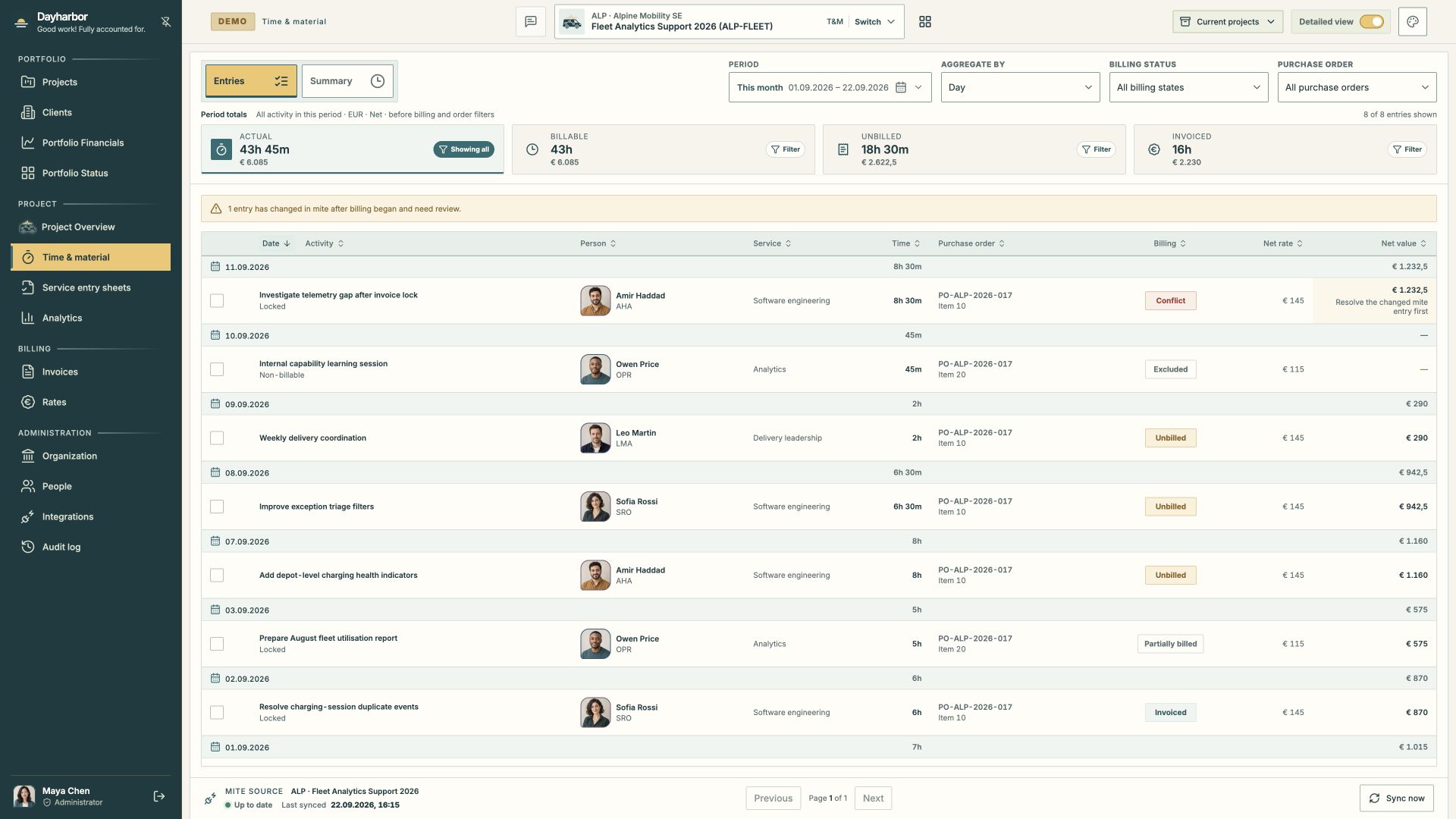
This real Aurora Studio demo capture contains the cases a reviewer actually needs: invoice-ready entries, a non-billable exclusion, partially billed work, invoiced work, and a source conflict that blocks further billing.
Understand the source boundary
mite remains the source for recorded activity. A sync imports the provider record, person, project, service, date, duration, note, and source timestamps. Dayharbor adds the project mapping, staff mapping, rate and purchase-order context, commercial status, invoice allocation, and review history needed for delivery and billing.
Correct the time in the source when the date, duration, activity, person, or service is wrong. Then sync again. Do not compensate for a bad source entry by inventing a billing adjustment that makes the table look right.
Source synchronization never means automatic approval. The reviewer still decides whether work belongs to the project, is billable, has the correct order item, and is ready for an invoice draft.
Read the period totals in the right order
The summary separates four amounts:
- Actual is all recorded effort in the selected period.
- Billable excludes work explicitly treated as non-billable.
- Unbilled is the billable portion still available for an invoice.
- Invoiced is the portion already allocated to invoices.
These totals explain different questions. Actual effort is a delivery fact. Billable effort is a commercial classification. Unbilled effort is a readiness signal. Invoiced effort is retained evidence. Do not expect them to be equal.
The period totals remain stable while billing and purchase-order filters narrow the register. This lets a reviewer see the full-period context and the subset currently under inspection.
Confirm people, services, and rates
Map provider people to organization staff so activity can be connected to the right profile, project membership, and rate. A provider identity and an application account are not the same thing: staff may have no login, and a user account may not record time.
Map imported services to the rate catalogue deliberately. The applicable rate should be valid for the person, project, service, currency, and commercial period. Dayharbor preserves saved rate snapshots for historical allocations, so a later catalogue change does not silently reprice evidence that has already been reviewed.
If a rate is missing or ambiguous, stop before invoicing. Resolve the staff membership, rate selection, or source mapping instead of entering a convenient value in invoice copy.
Assign the correct purchase-order authority
Purchase orders are more than references. They can define client, validity, currency, line items, effort or value limits, service compatibility, and attachments. Assign each billable entry to the correct active line.
Review order capacity before selecting entries for a draft. If the work exceeds the remaining authority, obtain a new or amended order or split the eligible portion according to the actual agreement. Never move work to an unrelated line merely because it has capacity.
The register shows both order number and item so the commercial basis remains visible next to each activity.
Use commercial statuses consistently
An entry may be:
- Unbilled when an eligible amount is available for a new draft.
- Partially billed when only part of its duration or value has been allocated.
- Invoiced when the billable portion is fully covered by retained invoice evidence.
- Excluded when the activity is intentionally non-billable.
- Conflict when the source changed after billing evidence was created.
Exclusion should be a conscious commercial decision. Examples include internal learning, rework not charged to the client, or activity outside the agreement. Keep the source activity visible; exclusion explains why it does not enter billing.
Partial billing is appropriate when only a real portion is ready or authorized. The remaining available duration must stay visible and cannot be allocated twice.
Resolve post-billing source conflicts
If a mite record changes after billing began, Dayharbor marks a conflict and prevents it from being selected for another draft. This protects the relationship between retained invoice evidence and the current source.
Review the original snapshot, the changed provider record, invoice allocations, service entry sheet, and order context. Then decide whether the source correction is non-commercial, whether invoice evidence must be reconciled, or whether a credit or follow-up invoice is required outside the current selection.
Do not clear a conflict merely to unblock the checkbox. The resolution needs to preserve an explainable chain from source activity to commercial outcome.
Use service entry sheets as signed evidence
Service entry sheets group eligible time for a period and provide a PDF that can be signed and retained. Linking an entry to a signed sheet makes the evidence visible from the register. A signed sheet does not itself create an invoice, and an invoice does not replace the sheet where the contract requires acceptance.
Review the people, activities, dates, duration, order references, and client identity before requesting or uploading a signature. Authorized managers can replace a service-sheet PDF while retaining its work and invoice links; replacements are recorded in history, and sheets used for invoices cannot be deleted.
A repeatable billing-readiness review
- Sync the selected period from mite.
- Investigate source errors and duplicate or changed records.
- Confirm project, person, service, rate, and currency mappings.
- Classify non-billable work explicitly.
- Assign eligible work to the correct purchase-order item.
- Check order validity and remaining effort or value.
- Confirm required service entry sheet evidence.
- Review partial, invoiced, and conflicted allocations.
- Filter to Unbilled and select only the work intended for the next invoice.
Once the register is clean, continue with preparing an invoice draft. For connection setup and mapping principles, see connecting mite and sevdesk.