Integrations are organization-owned connections to external systems. They make source records available to Dayharbor workflows, but they do not transfer authority to make delivery or financial decisions. Keep credentials, mappings, synchronization, and human review as separate concerns.
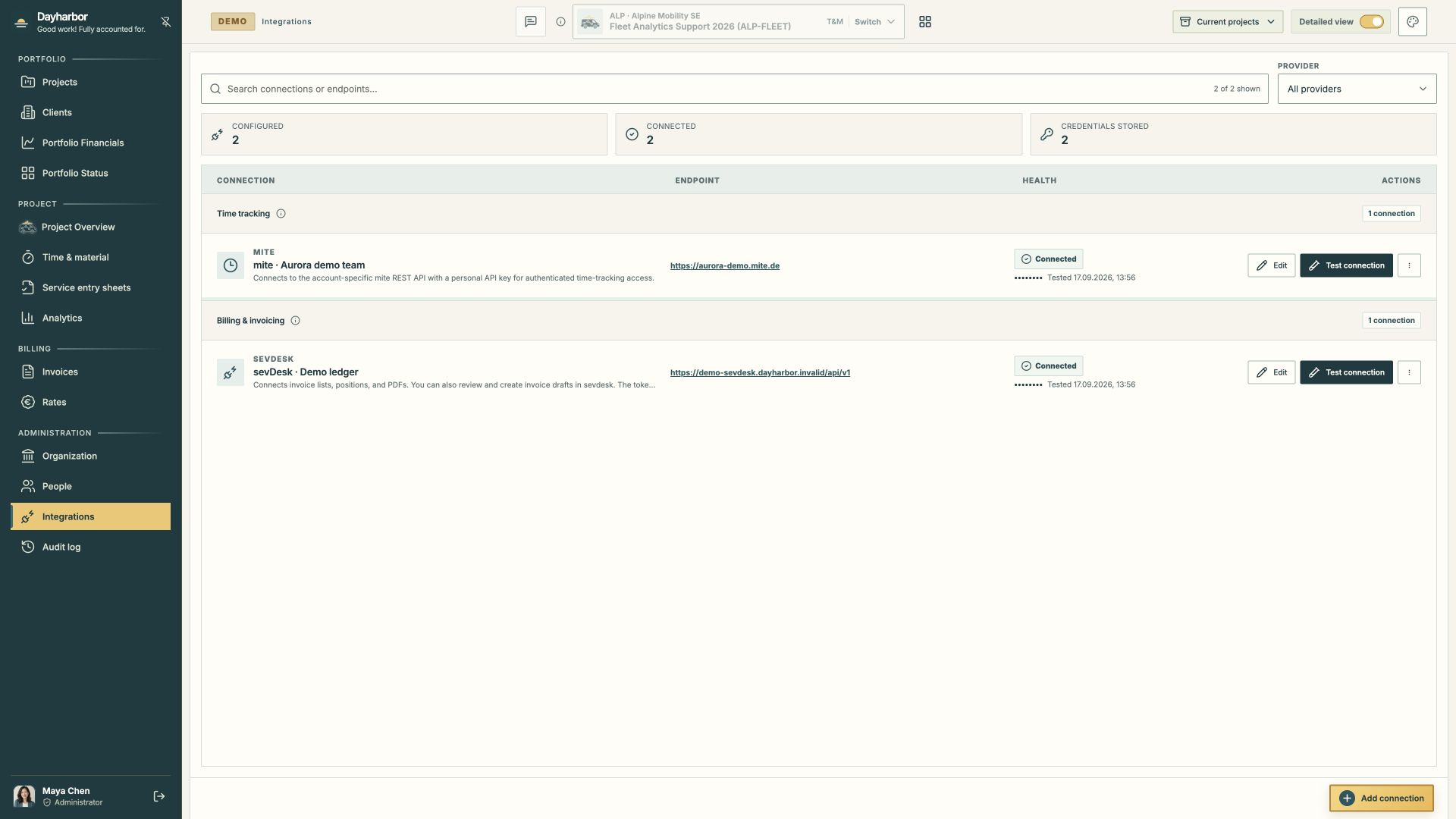
This real Aurora Studio demo capture shows one connected mite account and one connected sevdesk ledger. The demo providers are exact in-process simulations, so the screens demonstrate health, mappings, time, invoices, PDFs, and draft previews without contacting an external account.
Prepare the provider accounts
Before adding a connection, decide which provider account is authoritative, which data the integration may access, who owns the credential, and how the credential will be rotated or revoked.
Use a dedicated credential with the narrowest provider scope that supports the workflow. Do not paste a personal credential whose broader access is neither understood nor approved. Store required secrets only through the encrypted operations or organization settings—not in source control, notes, or screenshots.
Confirm the provider base URL and region. A plausible-looking endpoint can still target the wrong tenant or environment.
Add and test the connection
Organization administrators manage tenant integrations. Create the connection, enter its endpoint and credential, save it, and run Test connection. A successful test confirms that Dayharbor can authenticate to the configured endpoint at that moment. It does not prove that every person, project, service, client, article, invoice, or permission is mapped correctly.
The register records connection health and the last test time without exposing the secret. Re-test after credential rotation, provider permission changes, endpoint changes, or unexplained synchronization failures.
When a connection is no longer required, first understand which imported or mapped records depend on it. Removing future access should not erase retained evidence that supports past delivery and billing.
Map mite people and projects deliberately
The mite integration synchronizes provider people, projects, services, and time entries. Map a provider person to the correct organization staff profile. The mapping connects recorded activity to capacity, assignments, rates, and display identity; it does not create a login.
Map the Dayharbor project to the authoritative mite project. During project setup, an administrator may connect an existing source project or create a provider project through the supported workflow. Confirm the client, short form, and service model before doing so.
Imported services must resolve to the intended rate or rate code. A generic “Development” service may need different rates by project, person, or commercial period. Review the actual membership and rate selection rather than assuming the provider label is sufficient.
Synchronize without overwriting the source
A sync reads provider records and stores the context required for review. Dayharbor does not edit source timesheets during normal synchronization. Correct wrong activity in mite, then sync again.
Review sync status and timestamps. Investigate missing entries, changed source timestamps, unexpected people or services, and duplicates. A post-billing change creates a conflict because the current provider record no longer matches retained invoice evidence.
Manual Sync now is useful after a known source correction. Scheduled synchronization keeps normal activity current. Repeatedly pressing sync does not resolve a mapping or credential problem; inspect the specific status and connection health.
Map sevdesk clients, articles, and invoices
The sevdesk connection reads contacts, invoice lists, positions, PDFs, and status. It can also create a reviewed draft when an authorized billing manager explicitly confirms the request.
Map Dayharbor clients to the correct provider contacts. Similar names are not enough—confirm customer number, legal entity, and commercial context. Map rate codes to provider articles with the right description and tax treatment.
Imported invoices may be confirmed, likely, unmapped, or mismatched. Treat automatic identification as a review aid. Confirm project references, client, positions, dates, amounts, invoice status, and retained task or time allocations.
Keep provider facts and Dayharbor decisions distinct
Provider facts include the source identifier, activity, duration, person, service, contact, invoice number, provider status, and PDF. Dayharbor decisions include the project mapping, order assignment, exclusion, task link, rate source, allocation, publication, and audit context.
That distinction matters when a source changes. The application can preserve what was synchronized and what a reviewer decided without claiming that the provider itself contains the Dayharbor decision.
Use AI suggestions with explicit review
Authorized users can request time-to-task assessment for imported time or invoice analysis for an uploaded PDF. These workflows require deliberate action and return suggestions; they do not assign time, post invoice mappings, or create accounting records automatically.
Review the candidate scope, model output, confidence language, warnings, and supporting evidence. A “high” suggestion is not a calibrated probability or authorization. Apply only the matches that are supported by project scope and source evidence.
For real documents, confirm organizational approval and applicable provider data controls before sending content to an AI provider. Merely uploading an invoice does not trigger analysis.
An operational integration checklist
At setup and after major changes:
- Confirm the authoritative provider tenant and endpoint.
- Approve the credential owner, scope, storage, and rotation plan.
- Test the connection.
- Map clients, projects, people, services, rates, and articles with stable identifiers.
- Run a small synchronization and reconcile counts.
- Review a representative time entry or invoice from source to Dayharbor evidence.
- Test a draft preview without sending or booking it.
- Confirm who can manage the connection and who can use its financial workflows.
- Review health and synchronization failures regularly.
- Retain audit and project revision evidence for material changes.
Continue with reviewing time-and-material work for the daily source-to-billing workflow and audit history for explaining synchronized changes.