Client access should make approved delivery information easier to understand without exposing the internal operating record. Dayharbor builds the client experience from a dedicated server-side projection rather than hiding private fields with presentation rules alone.
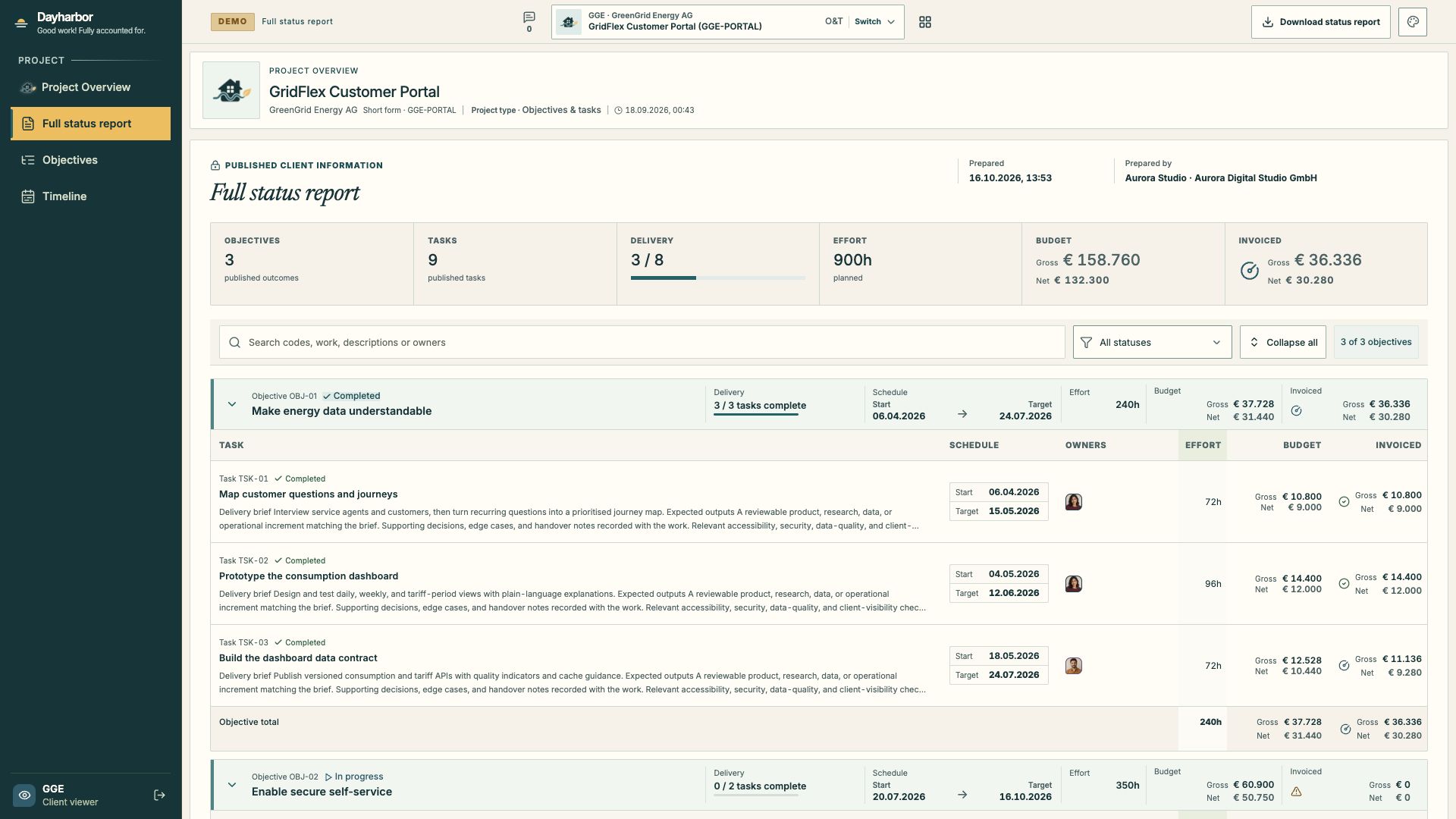
This screenshot was captured while signed in as the fictional GreenGrid client viewer in Aurora Studio. The navigation contains only the published project briefing, full status report, objectives, and timeline. Administration, rates, raw invoices, integrations, audit history, internal notes, and mutations are absent.
Establish the access boundary first
A client viewer is linked to a client and receives explicit project grants. The project must also be marked Visible to client viewers. Both conditions are required; being a user in the same organization is not enough.
Direct requests to internal projects return no project content. Individual task APIs remain forbidden to the client role except through the client-safe projections that apply publication rules. This protects the boundary even if someone knows or guesses an internal URL.
Review client access whenever a project changes client, a person leaves, a new project is created, or the commercial relationship ends. Do not reuse an internal staff account as a client identity.
Publish from the outside in
Publication works in layers:
- The client viewer has access to the client and project.
- The project is visible to client viewers.
- An objective is marked client visible.
- A task is marked client visible.
- Any conversation message chooses a client-visible audience.
A task appears only when the project, its parent objective, and the task itself are all published. This lets a project share an approved delivery story while keeping internal planning branches private.
Before publishing, read the project, objective, and task descriptions as an external recipient. Remove internal shorthand, speculative statements, private names, security details, and unsupported promises. Ensure that status and dates reflect the story the client has actually been told.
Know what the client briefing contains
The overview explains the published project purpose, functional and technical scope, intended outcome, progress, project period, published objective and task count, planned effort, budget, invoiced totals, schedule health, objective outcomes, attention items, and next commitments.
Published client views include planned effort plus budget and invoiced totals, with Gross primary and Net alongside it. A configured approved gross budget is shown with its calculated net value; otherwise totals are derived from published priced work. Team identities remain optional.
Cancelled and moved published history remains available in the complete status report so the client can understand changes. Current progress, effort, and financial totals exclude historical work where appropriate.
Keep private records private
The client projection excludes:
- raw rates and rate catalogues;
- invoice documents, provider payloads, and references;
- unbilled-work details;
- staff contact and provider identities;
- internal sources and integration mappings;
- organization administration;
- audit history and project revisions;
- general exports and mutation controls;
- internal notes and internal-only task messages.
This is not a promise that every published sentence is safe. Authorized editors still decide what to write and publish. Use the technical boundary and an editorial review together.
Use conversations for governed collaboration
Task conversations can include internal messages, client-visible messages, and questions that require resolution. Choose the audience for every message. A published task does not make its internal thread public.
Write client-visible messages so they remain understandable in context later. State the decision, question, or evidence directly. Avoid pasting raw internal chat. Resolve questions explicitly when the answer is accepted, and use read positions as awareness—not as proof of agreement.
Treat the full report and PDF as one publication
The online full status report and downloadable PDF use the same canonical client projection. That alignment reduces the risk that a PDF contains fields the online client view would omit.
Before a milestone review:
- Inspect the client overview as a client viewer.
- Open the full status report and scan every published objective and task.
- Download the PDF and check headings, pagination, totals, dates, and footer.
- Confirm that hidden work does not affect published delivery or financial aggregates.
- Check that client-visible conversations have the intended audience.
- Correct source records, then regenerate the report.
Do not edit the PDF independently. Fix the published project data so the online and exported views remain consistent.
A publication checklist
Ask an authorized project manager to confirm:
- the viewer belongs to the correct client;
- the project grant and visibility flag are intentional;
- project purpose and scope are current;
- each published objective and task is appropriate for the client;
- statuses, dates, effort, budget, and invoiced totals are explainable;
- moved and cancelled history tells the right story;
- team names follow the project’s sharing choice;
- every client-visible conversation is suitable for that audience;
- the online view and PDF match.
The result should be useful enough that a client can understand progress without asking for an internal dashboard export. To improve the underlying plan, see objectives and tasks. To configure the responsible internal team, continue with people and access.