People data in Dayharbor serves three different purposes: a staff directory describes people, project assignments describe delivery responsibility, and organization memberships describe login access. Keeping those purposes separate prevents a job title from accidentally becoming a security rule.
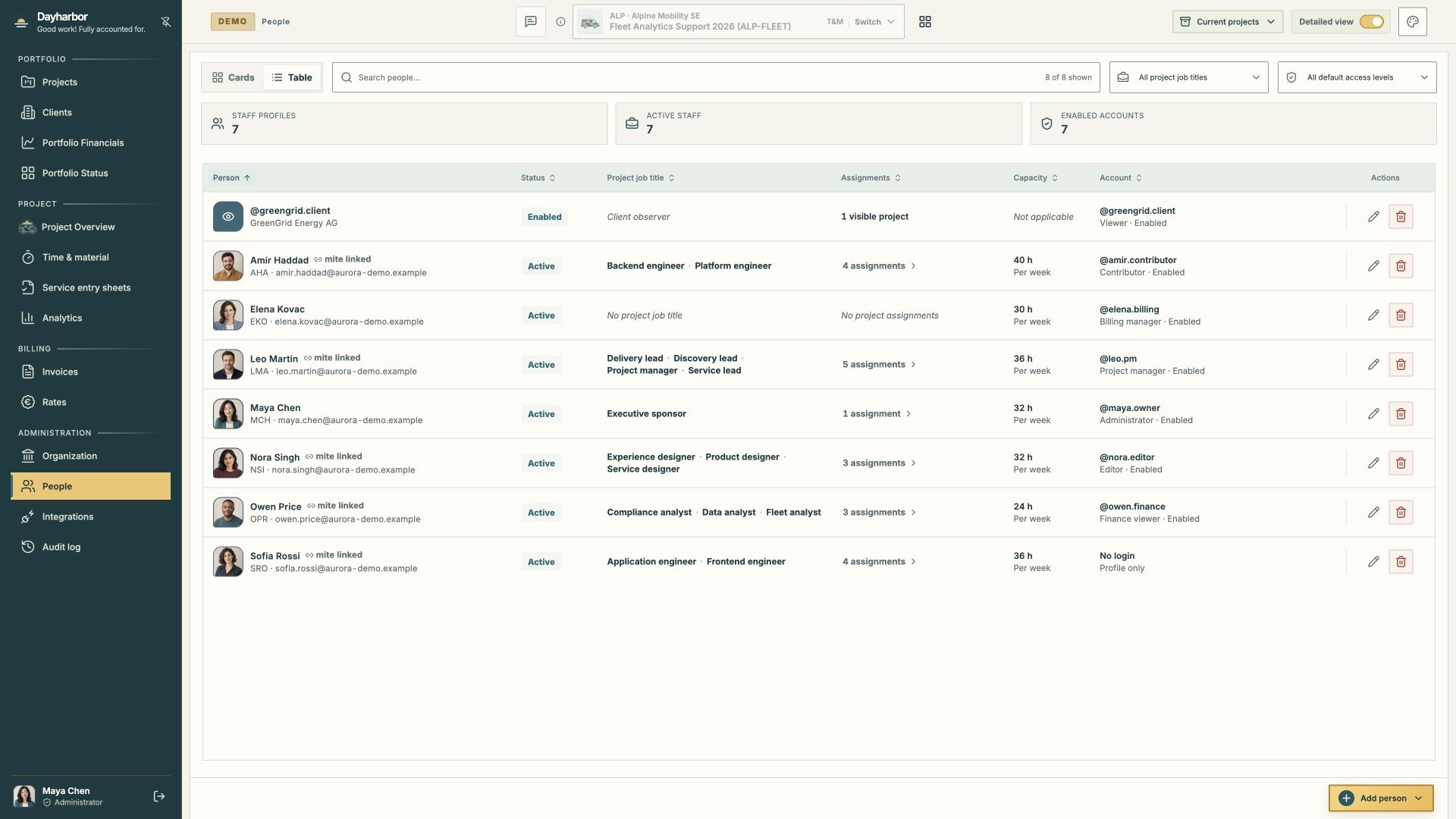
The Aurora Studio demo directory makes the distinctions visible in one table: staff status, project job titles, assignments, weekly capacity, account identity, and default access. A client viewer appears as an access record without being treated as internal delivery staff.
Create the staff profile for the person
A staff profile holds the organization-owned working identity: name, short form, contact fields, avatar, active state, capacity, provider mapping, and project assignments. A person may have a profile without a Dayharbor login—for example, a specialist whose time is synchronized from mite but who never opens the application.
Use a stable short form that remains recognizable in compact tables and reports. Set weekly capacity to the amount genuinely available for planning, not automatically to contract hours. Mark a profile inactive when the person should no longer receive new assignments; preserve historical allocation snapshots.
Personal and provider fields are sensitive. Non-administrators see only the colleague information needed for accessible projects, and planning capacity is restricted by capability.
Add a membership only when login is needed
An organization membership connects a global identity to this workspace. One identity can belong to multiple organizations while keeping a single password. Invitations create or join the identity without exposing password administration to the organization owner.
The organization controls membership role, enabled status, default project access, explicit project overrides, and delegated financial capabilities. The signed-in person controls their own password and profile. Administrators cannot reset another user’s global password.
Staffless invited members and zero-project memberships are valid. They let an administrator prepare access before assigning delivery work. Link a membership to an existing unused staff profile deliberately instead of creating duplicate people.
Understand the delivery access presets
The default access preset defines the starting capability set for projects assigned in this organization:
- Administrator manages the organization; owner-only safeguards still apply.
- Project manager manages delivery and client publication.
- Editor edits all objectives and tasks in assigned projects.
- Contributor updates only assigned task progress and supporting evidence.
- Internal viewer reads internal delivery without editing.
- Viewer receives only explicitly granted, client-published project information.
- Finance viewer reads permitted financial information.
- Billing manager manages permitted financial workflows.
Financial capability does not imply delivery editing, colleague personal-data access, or platform access. Rate management is delegated separately. Platform operators are not tenant administrators and cannot impersonate organization users.
Use project-specific overrides sparingly. An override is valuable when one project genuinely needs a different access level; widespread overrides usually indicate that the default or assignment model needs attention.
Separate assignment from authorization
Project assignments record the project, job title, and applicable rates. A “Service lead” or “Backend engineer” title explains responsibility but grants no permission by itself.
For linked non-administrator members, assigned projects determine scope; the default or explicit override determines what they may do there. An editor can see and edit all objectives and tasks in an assigned project even when not allocated to each task. A contributor edits only their own assigned tasks, including shared allocations.
When someone changes responsibility, update the assignment and access separately. For example, moving a person from contributor to project manager may require a new job title, a different access preset, and publication responsibility—but each change should be intentional.
Protect ownership and account lifecycle
The final enabled owner/Administrator cannot be disabled, demoted, or deleted. Transfer ownership before removing the current owner. Only an owner may delegate Administrator access or transfer ownership.
Disabling a membership invalidates access without deleting project history. Deleting staff removes the organization membership and detaches live staff links from current assignments, while preserving names, hours, rates, and cost snapshots needed by historical records. Read the impact confirmation carefully.
Use invitations for normal onboarding. Use the verified owner-recovery workflow only when the organization has lost its owner. Operations staff initiate an expiring recovery link; they never choose or learn the recipient’s password.
Plan capacity without turning it into permission
Weekly capacity supports portfolio and project planning. Task allocation explains how much planned effort belongs to each person. Actual time shows what was recorded. These are related but not interchangeable.
During a capacity review, compare assigned effort and dates across accessible projects, then discuss leave, external commitments, skill constraints, and uncertainty. Do not grant broader access merely to make a person appear in a capacity view, and do not remove access merely to reduce a workload number.
A least-privilege setup sequence
For each person:
- Create or confirm one staff profile.
- Set truthful capacity and active state.
- Map the provider person when time synchronization is needed.
- Assign only the projects where the person has a delivery responsibility.
- Add job titles and applicable rates for those projects.
- Invite or link a login identity only when application access is needed.
- Choose the narrowest default access that supports the person’s work.
- Add a project override or financial delegation only for a concrete requirement.
- Review the effective result by signing in with a representative demo or test role.
Revisit access after organizational changes, client publication changes, project closure, and staff departure. The directory should let an administrator explain both why this person is on the project and why this account can perform this action.
For the external boundary, read sharing progress with clients. For provider identities and source mappings, continue with connecting mite and sevdesk.