Dayharbor supports two kinds of client work: a scoped plan made of objectives and tasks, and a time-and-material service built from recorded activity. The first important decision is not which screen to open. It is which evidence should determine delivery and billing.
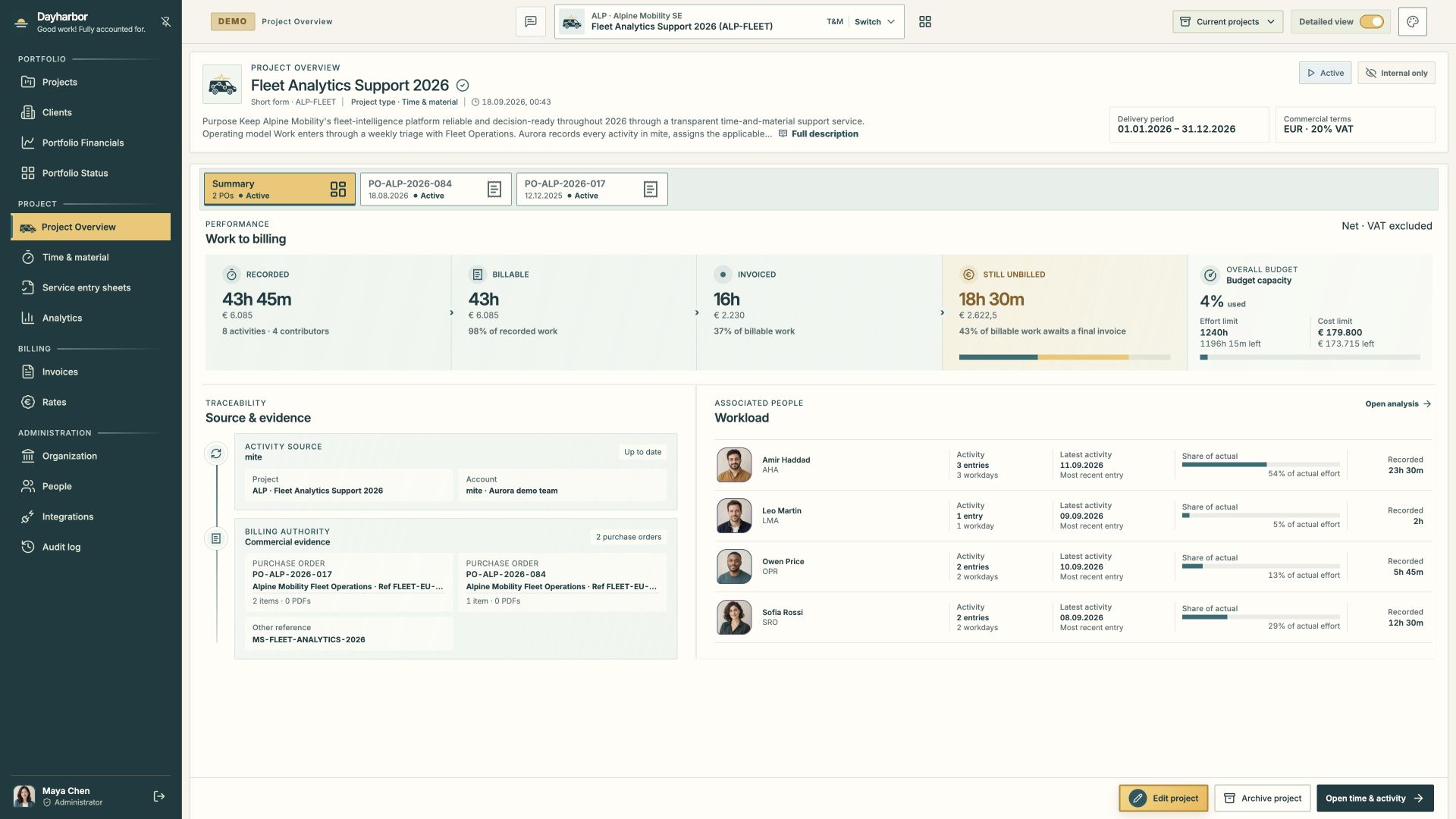
The screenshot comes from the fictional Aurora Studio demo organization. Its Fleet Analytics Support project uses the time-and-material model, so the overview follows recorded work from billable time to invoices and remaining capacity.
Begin with the client record
Create the client before the project. The client record is the stable home for the legal name, short name, billing identity, contacts, and projects that belong to the same customer. A short name should be recognizable in compact selectors; the legal name should remain suitable for commercial records.
Avoid creating a second client merely because a new department is buying the work. Use project references, purchase orders, and project descriptions to capture the engagement-specific context. A separate client is appropriate when the legal or access boundary is genuinely different.
Choose the delivery model from the commercial promise
Choose Objectives & tasks when the agreement is primarily about delivering defined outcomes or scope. The project plan can hold objectives, tasks, schedules, planned effort, assignments, rates, delivery status, acceptance context, source references, and staged invoicing. This works well for launches, implementations, research programs, design engagements, and other work where progress is explained through completed commitments.
Choose Time & material when the commercial record is primarily approved activity at agreed rates. Dayharbor connects people, services, rates, purchase orders, recorded time, service entry sheets, and invoice drafts. This works well for ongoing support, maintenance, retained specialist capacity, and services whose exact activity is known only while the work is performed.
Do not use the model as a label for how the team happens to work. Use it to reflect what makes a unit of work billable and explainable. If a fixed-scope project also records time, keep the objective plan authoritative; recorded time can be linked as performance evidence without silently changing planned hours or the billing balance.
Write a project description that can survive handovers
A useful project description answers four questions:
- What outcome does the client need?
- What functional and technical scope is included?
- What is explicitly outside the current agreement?
- What evidence will show that the work succeeded?
Write for the person who joins three months later. Replace vague phrases such as “build the platform” with the journeys, operational constraints, quality thresholds, and acceptance evidence that guide decisions. Dayharbor supports Markdown, so short headings and lists are preferable to one dense paragraph.
AI-assisted description generation can create an unsaved draft for an authorized delivery editor. Treat that output as a starting point: review every statement against the actual agreement before saving. Generating a draft does not authorize scope, publish it to a client, or replace a responsible human decision.
Record schedule and commercial terms separately
The delivery period answers when the project is expected to run. The currency and VAT rate explain the commercial presentation. Budget limits, rates, purchase orders, and project references explain how much may be consumed and under what authority.
For objective-based projects, planned effort and priced assignments create the project’s calculable value. If there is a separately approved project budget, record it explicitly so the overview can distinguish approved capacity from calculated task value. For time-and-material projects, define the effort and cost ceiling when one exists, then attach the purchase orders that authorize particular services or periods.
Keep reference identifiers typed and meaningful. A purchase order, contract, Jira project, or client reference is more useful as a structured reference than as a fragment buried in notes.
Add people without confusing responsibility and permission
Project assignments describe who is expected to contribute and in which job capacity. Login access describes what a person may see or change. They are intentionally separate.
Assign project job titles and applicable rates to staff who will work on the engagement. Then confirm that each account has the appropriate organization default and, where necessary, a project-specific override. A project manager can manage delivery and publication; an editor can edit the plan; a contributor changes assigned work; financial capabilities are granted independently.
Make the overview pass a five-minute test
Before considering setup complete, open the project overview and ask whether a new project lead can answer these questions without opening an edit form:
- What is this project for, and is it active?
- What model governs its delivery and billing?
- What period and commercial terms apply?
- What has been delivered, recorded, invoiced, or left unbilled?
- Which budget or capacity constraint needs attention?
- Which source system and commercial evidence support the numbers?
- Who owns the work?
If the overview cannot answer those questions, add the missing project description, assignments, schedules, rates, references, order evidence, or source mappings. The goal is not to fill every field. It is to make the project’s operating truth visible.
A practical setup sequence
Use this order for most new work:
- Create or confirm the client.
- Create the project and choose its delivery model.
- Write the purpose, scope, outcomes, period, currency, and VAT basis.
- Add references and, for time-and-material work, purchase orders.
- Assign staff, job titles, rates, and access.
- Build the objective plan or connect the time source.
- Review the overview before inviting wider participation.
- Publish client-visible information only after an internal review.
Once this foundation is stable, use the portfolio review to spot cross-project decisions, the objective planning guide for scoped work, or the time-and-material guide for activity-based services.