Dayharbor prepares invoice drafts; it does not silently send or book them. The workflow makes the selection, commercial basis, calculated values, invoice copy, attachments, provider preview, and final human review explicit before anything is created in sevdesk.
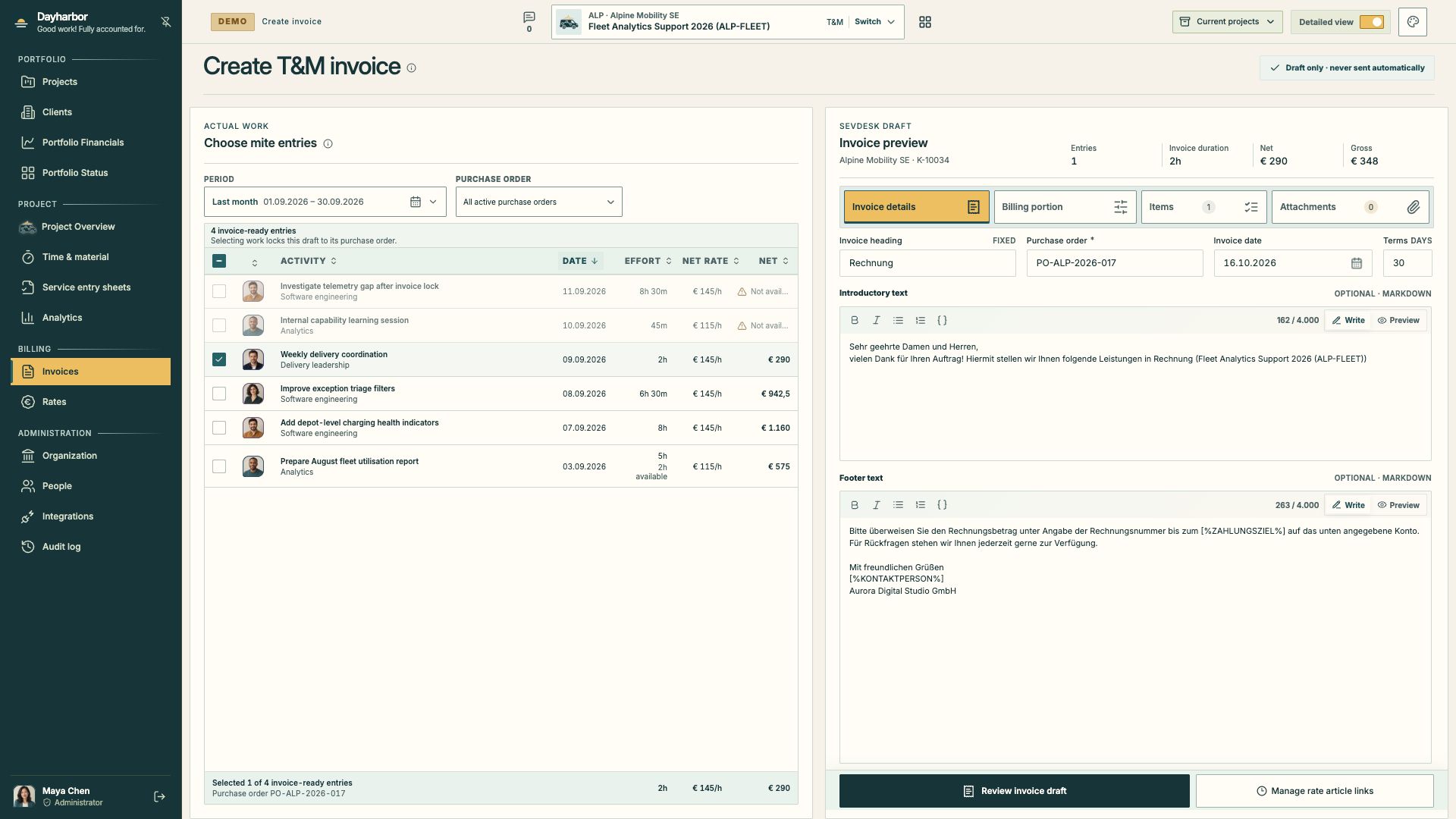
The captured Aurora Studio demo screen shows one selected entry, its purchase order, 2 hours of delivery-lead effort, a net value of €290, a gross value of €348, and editable invoice copy. The banner states the key safeguard: Draft only · never sent automatically.
Start from eligible work
For a time-and-material project, choose the service period and inspect every candidate entry. Disabled entries remain visible so the reviewer can understand why they are unavailable: a conflict, exclusion, completed allocation, or another blocking condition should not disappear from the story.
Select entries from one purchase order at a time. The first selected entry locks the draft to its commercial basis. This prevents a single provider invoice from quietly mixing work authorized by unrelated orders.
For objective-based projects, begin from billable task portions rather than mite entries. The same principles apply: every portion needs delivery evidence, a rate or priced basis, remaining billable value, and a clear link to the task it represents.
Check the calculated portion
Before editing prose, review:
- selected entry or task count;
- invoice duration or billed effort;
- net amount and VAT calculation;
- gross amount;
- applicable currency and rate;
- purchase order and line item;
- already invoiced and remaining portions.
Partial billing must allocate an exact portion without losing the remainder. A five-hour entry with two hours available should not be presented as five new billable hours. Dayharbor retains allocations so later drafts cannot select the same portion twice.
If a total looks wrong, return to the source mapping, rate, order, or selection. Do not repair the number by manipulating descriptive text.
Review provider item mapping
sevdesk requires invoice positions to use provider articles or other supported item data. Link organization rate codes to the correct provider articles before draft creation. The mapping should express the actual service and tax treatment, not merely point to any active article.
Dayharbor uses the current catalogue mapping when an older assignment has no saved provider mapping, while preserving any non-empty historical snapshot. This avoids discarding retained evidence and still lets correctly maintained catalogue mappings support older work.
Open Manage rate article links when the preview cannot produce a valid item. After updating the mapping, return and re-review the draft.
Write invoice copy for the recipient
The heading, introductory text, footer, date, and payment terms become part of the provider draft. Templates may contain supported sevdesk placeholders. Preview Markdown before submission, especially after pasting content from another system.
Good invoice copy identifies the engagement and service period without repeating every internal detail. Avoid internal task notes, confidential source context, personal data, or unresolved commentary. The invoice position and retained allocations already provide the structured evidence.
Check the recipient, customer number, contact, and order reference. An accurate calculation sent to the wrong client is still a serious error.
Add supporting items and attachments deliberately
The Items section shows the positions Dayharbor will request from sevdesk. Confirm quantity, unit, description, net price, VAT, and provider article. Where the contract requires signed evidence, add the relevant service entry sheet or approved document through the supported attachment workflow.
Attachments should support the invoice, not become a substitute for correct structured mapping. Confirm that each file belongs to the client and billing period and contains no unnecessary internal material.
Use the review step as a gate
Review invoice draft should be enabled only when blocking requirements are satisfied. The next step presents the full payload for a final check. Read it as if you were the client:
- Is the client and recipient correct?
- Does the service period match the selection?
- Is the purchase order valid and visible?
- Are quantities, rates, net, VAT, and gross correct?
- Are partial portions represented accurately?
- Do position descriptions and invoice copy make sense outside the project team?
- Are required attachments present?
- Are any conflicts, missing mappings, or warnings unresolved?
Creating the draft is a provider mutation. It requires an authorized billing manager and an explicit action. In the public demo, the application shows the normal result and rolls the business mutation back; in a real organization, the resulting provider draft must be reviewed and sent according to the organization’s finance process.
Reconcile provider invoices independently
Dayharbor also imports provider invoices and PDFs. Map imported positions to projects, tasks, or time entries using the retained evidence. Confirmed, likely, unmapped, and mismatched states describe the quality of that relationship.
Do not assume that an invoice created outside Dayharbor is correctly mapped because its customer name is familiar. Review identifiers, references, position descriptions, amounts, dates, and supporting allocations.
Optional OpenAI invoice analysis requires explicit consent and returns suggestions with supporting page evidence. It does not override sevdesk facts, authorize a mapping, or post a financial decision. Review the extracted fields and confidence language manually.
After draft creation
Verify the draft in sevdesk, follow the finance team’s approval and sending process, then sync or reconcile the resulting invoice evidence. Dayharbor should be able to show which work the invoice covers and what remains available.
For the upstream review, read time-and-material billing readiness. For explaining later corrections, use project revisions and audit history.